
- A Quiet Change in What Webmasters Celebrate
- Why AI Bots in Server Logs Matter for SEO and GEO
- Common Bot Names: AI Crawlers, Search Bots, and Human Traffic
- Good Bots vs Bad Bots: Which Traffic Helps Your Business
- How to Check AI Bot Traffic in Your Server Logs
- How GA4 and Server Logs Work Together
- What Should You Do After Seeing AI Bots in Your Logs?
- Key Difference Between ChatGPT-User Requests and AI Citations
A Quiet Change in What Webmasters Celebrate
For years, many webmasters opened their analytics dashboards hoping for one thing: more human visits and fewer bots.
Bots were often treated as noise, requests that consumed bandwidth, inflated logs, and created no clear business value.
That perspective is changing.
Today, when a website owner sees names like GPTBot, ChatGPT-User, or ClaudeBot inside server logs, the reaction is often different, curiosity rather than concern.
The reason is simple. Some bots are no longer just crawling pages for indexing. They may also be part of how AI systems discover brands, understand content, and decide which websites deserve citation when users ask questions in AI search experiences.
This does not mean every AI bot visit leads to traffic. But it does mean your content may be entering a new visibility layer beyond traditional search.
Why AI Bots in Server Logs Matter for SEO and GEO
In traditional SEO, a crawler such as Google Googlebot visits your pages so they can appear in search results.
In GEO (Generative Engine Optimization), AI crawlers help systems understand whether your content is relevant enough to support future answers.
That distinction matters.
More AI crawler activity may suggest:
Your content is discoverable, your domain is technically accessible AI systems are revisiting your pages
But crawl activity alone does not guarantee citations or referrals. A crawler visit means discovery. A citation means trust. A click means user action. The strongest signal happens when all three increase together.
Discovery, Trust and Action as an image
Common Bot Names: AI Crawlers, Search Bots, and Human Traffic
| Traffic Type | Naming Convention | Purpose |
| AI crawler | GPTBot | Training and content discovery |
| AI retrieval bot | ChatGPT-User | Live content fetch during answer generation |
| AI crawler | ClaudeBot | AI content discovery |
| AI crawler | PerplexityBot | Answer retrieval and citation discovery |
| Search crawler | Googlebot | Search indexing |
| Search crawler | Bingbot | Search indexing |
| Human visitor | Chrome / Safari / Firefox | Actual browsing and engagement |
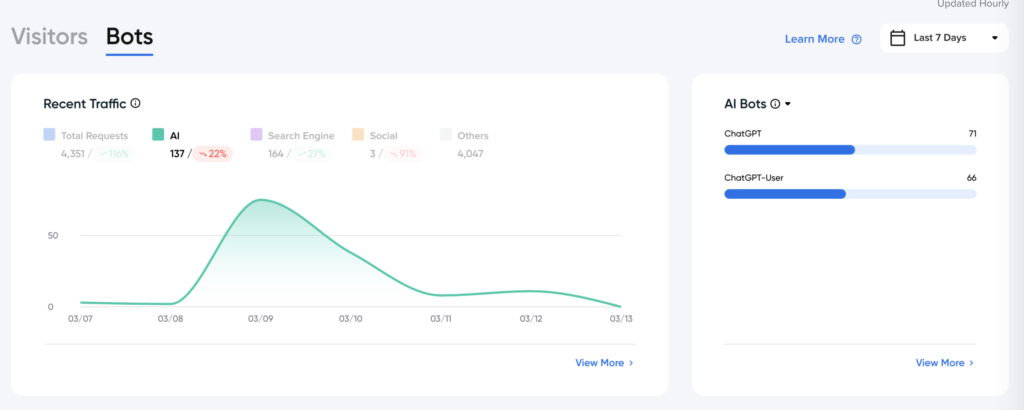
The most important distinction is that ChatGPT-User often reflects live retrieval, while GPTBot reflects broader crawling.
Good Bots vs Bad Bots: Which Traffic Helps Your Business
Not all bots are harmful.
Good bots usually:
- Follow robots.txt
- Crawl predictably
- Identify themselves clearly
Examples include Googlebot, GPTBot, and Bingbot.
Bad bots often:
- Scrape aggressively
- Fake user agents
- Overload pages without purpose
Bad bots can distort infrastructure costs and create noise in reporting.
The goal is not blocking all bots. It is understanding which bots support discoverability and which bots damage performance.
How to Check AI Bot Traffic in Your Server Logs
The best place to see AI bot activity is your server log file. Look for the user-agent field. Common AI patterns include:
- GPTBot
- ChatGPT-User
- ClaudeBot
- PerplexityBot
- Googlebot
You can filter logs by user-agent inside hosting logs, CDN dashboards, or tools such as Cloudflare.
A useful habit is tracking trends monthly rather than daily, because meaningful crawler behavior appears over time.
In my case, I use DreamHost to check server logs and identify which bots are visiting my website.
How GA4 and Server Logs Work Together
1. Log in to your DreamHost panel
Go to your DreamHost account dashboard and open the hosting panel.
2. Select Websites or Manage Websites
Choose the domain where you want to inspect traffic.
3. Open Logs or Access Logs
DreamHost stores raw visitor requests under server access logs.
4. Download or open the latest access log file
Look for recent files, usually grouped by date.
5. Search for bot names inside the log file
Use search functions such as:
- GPTBot
- ChatGPT-User
- ClaudeBot
- PerplexityBot
- Googlebot
6. Review the user-agent field
This field tells you whether the visit came from:
- An AI crawler
- A search crawler
- Or, a human browser
7. Compare frequency by date
Instead of checking one line only, review whether AI bot appearances increase weekly or monthly.
That helps you understand whether your content is becoming more discoverable.
Once the log file is open, the easiest way is to search directly for known AI crawler names. This quickly shows whether AI systems are discovering your pages and how often they return.
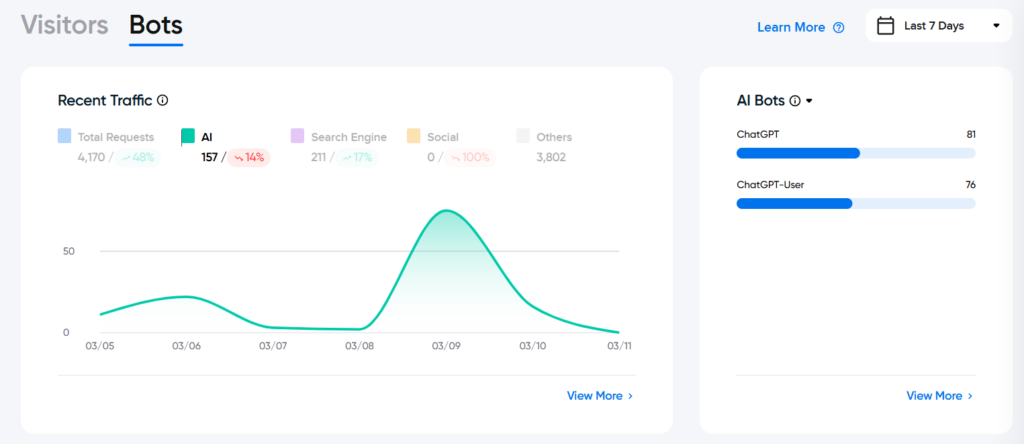
Example of AI crawler entries inside server logs showing live bot activity by user-agent.
In this example, AI bot logs show both ChatGPT and ChatGPT-User activity. ChatGPT often signals crawler discovery, while ChatGPT-User may indicate live retrieval during user prompts. When both appear consistently, it suggests the site is not only discoverable by AI systems but may also be relevant enough to support answer generation.
Important note: Logs are not proof of GEO success. They are often the earliest observable signal that machines are beginning to notice your content before citations, referrals, or measurable visibility appear.
What Should You Do After Seeing AI Bots in Your Logs?
Seeing AI bots in your logs is interesting, but the real value begins when you decide what to do with that signal.
The first next step is to move beyond counting visits and start looking at which type of content attracts machine attention repeatedly.
If AI crawlers return often, that usually means your site is technically accessible and your content is entering discovery layers. But discoverability alone is not yet GEO success.
The stronger question is: Which pages deserve to become citation-ready?
In practice, pages that often perform better in AI systems include:
- FAQ pages that answer one question clearly
- Comparison pages that explain differences directly
- Definition pages that simplify technical topics
- Practical guides with step-by-step explanations
- Troubleshooting pages that solve one problem quickly
- Product pages with structured specifications and context
These formats tend to work well because they are easier for both search crawlers and AI systems to interpret.
The second step is to watch whether crawler activity appears after publishing or updating content.
A simple content freshness check includes:
- Reviewing whether AI bots appear after a new article goes live
- Comparing spikes before and after updating an existing page
- Noting whether recently refreshed pages attract repeat visits
- Checking whether evergreen pages continue receiving crawler attention
If a newly published article triggers crawler spikes, that is often a useful signal that your publishing activity is visible to machine systems.
The third step is to connect logs with visibility outcomes.
A page may receive repeated ChatGPT-User visits but still produce no measurable referral traffic. That does not mean failure. It often means the content is being read by AI systems but has not yet become strong enough to earn citation consistently.
That is where refinement matters: improve clarity, strengthen topical depth, and make answers easier to extract.
In GEO, logs should not be treated as proof of success.
They are better viewed as an early signal that your content is being noticed — and an invitation to improve the pages machines already seem interested in
| URL | Content Format | GPTBot Requests | ChatGPT-User Requests | AI Citations | AI Referral Visits |
| URL 1 | FAQ + Article + Schema | 10 | 8 | 8 | 1 |
| URL 2 | Product Page + Specifications | 14 | 10 | 3 | 2 |
| URL 3 | Comparison Guide + Structured Headings | 9 | 7 | 6 | 3 |
URL
Which page is being evaluated
Content Format
Why that page may attract machine attention
GPTBot
Discovery signal
ChatGPT-User Visits
Possible retrieval signal
Citations
AI answer usage signal
AI Referral Visits
Human click outcome
Sequence
crawl → retrieval → citation → click
Key Difference Between ChatGPT-User Requests and AI Citations
ChatGPT-User requests show that OpenAI retrieved your page during answer generation, which means your content was considered relevant enough to inspect. AI citations go one step further: they indicate that your content was actually selected to support or appear in the final answer shown to the user. In simple GEO terms, retrieval signals discoverability, while citations signal trust and usefulness in the output.
A strong GEO page does not always generate high referral traffic immediately. In many cases, machine retrieval and citation happen first, while human clicks remain limited until answer trust increases or query intent becomes deeper.
- Page is machine-readable
- Retrieval likely happens
- Citation probability is strong
- Human click-through still limited
How GA4 and Logs Work Together
Google Analytics usually does not show crawler bots because most bots do not execute JavaScript.
GA4 mainly captures human visits after AI-generated answers lead someone to click.
This means:
- Logs show crawler discovery
- GA4 shows human engagement
If you see rising ChatGPT referrals in GA4 and rising ChatGPT-User in logs, that is often a stronger GEO signal than either source alone.
The future of SEO is no longer only about rankings. It is also about whether machines notice your content before people do.